

Overview
The agent can make new files as well as work on the ones you have. Describe what you need, and it writes the file, usually reading your existing files for the facts. For example, it can read every invoice in a folder and build a spreadsheet of them, or turn a report into a slide deck. A file the agent makes appears in the chat first. Nothing goes into your workspace until you save it to a folder.What it can make
It can also convert between formats, for example a Markdown file to Word or PDF, or a Word document to Markdown.
For something you only need to read once, like a quick summary or an answer, the agent writes it in the chat instead of making a file. Ask for a file or a note when you want to keep it.
How to ask
Open the folder with your source files, open the agent and describe the file. Say the format, the structure and where the facts come from.Word
Excel
CSV
PowerPoint
Notes
Other formats
Getting the file
A file the agent makes appears in the chat as a file card. The card shows a preview of the top of the file, its name, type and size.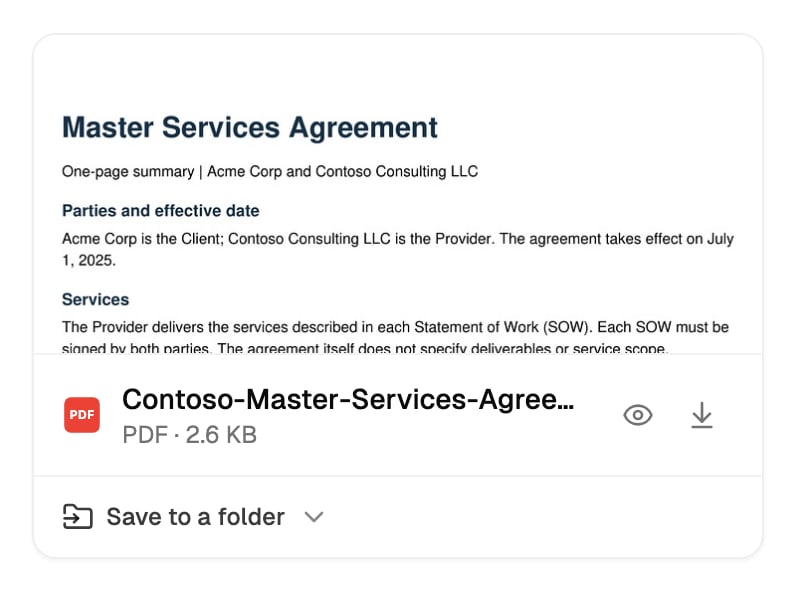
- View opens it in a preview. You can also click the preview itself. A PowerPoint deck shows its first slide only, and an HTML file shows its source text. Download them to see all of it.
- Download saves it to your device.
- Save to a folder puts it in your workspace or a connected drive. See Save it to a folder.
- Download all downloads every file in the card as one zip.
- Save all to a folder saves the whole set in one go. If you already saved some of them, the button says Save the other N to a folder.
- A card with more than four files shows the first three and +N more. Click it to see the rest.
Save it to a folder
1
Click Save to a folder
On the file card, click Save to a folder (or Save all to a folder for several files).
2
Choose the folder
Under Suggested, pick Here to save into the folder you’re looking at, or Workspace (top level). Otherwise, search with Search folders… and pick a folder from the list. The list includes folders on your connected drives.
Saving to a connected drive
On plans with connected drives, the folder list includes your Google Drive, OneDrive, SharePoint and Dropbox folders. The file is saved there, not in The Drive AI. You can only save into folders your account is allowed to add files to.How long files stay in the chat
- A file you don’t save stays in the chat for 30 days, then it’s deleted. Save or download anything you want to keep.
- The chat holds files up to 25 MB. If a file the agent makes is bigger, it can’t appear in the chat, but the agent can save it straight into a folder you name, for files up to 50 MB.
- Download all takes up to 20 files and 200 MB at a time. Download larger sets one file at a time.
Lists and reports of many files
When you ask for a list that’s longer than a page, such as every PDF over 10 MB, every duplicate file, or every row of data the agent pulled out of your documents, the agent writes the whole list to a file instead of typing it in the chat. You get a CSV, or an Excel workbook if you ask for one.- One file holds up to 200,000 rows. If there are more, the agent says the file is partial and suggests narrowing it, for example to a subfolder or a date range.
- A very large export runs in the background. The agent waits and posts the file when it’s ready.
- The card shows how many rows the file has. Save it to a folder like any other file.
Changing a file
To change a file the agent just made, ask: “Add a section on Q2 projections.” It makes the file again with your changes, as a new card in the chat. To change a file that’s already in a folder, open it or name it: “In the vendor tracker, add a column for contract end date.” The agent edits that file in place, so its link and sharing stay the same.- It asks first. An edit to an existing file shows a card that needs your OK. See Approving and undoing.
- The previous version is kept. In The Drive AI, you can ask the agent to restore it (see Versions and Trash), or undo the change from its card.
- On a connected drive, the edit can be undone unless the earlier version was too large to keep a copy of. See Undo on each drive.
Save the files it makes
By default, a file the agent makes stays in the chat until someone saves it. When you ask the agent to save one into a folder, it asks you to confirm where. An owner or admin can change this in Settings > Agent with Save the files it makes. When it’s on, the agent no longer asks for that confirmation when it saves a new file into a folder. It still only saves a file into a folder when you ask it to, and other changes still ask as usual.Tips
Say the format
Say the format
“Create a PDF report” gets you a PDF. “Create a report” leaves the choice to the agent.
Describe the structure
Describe the structure
“A spreadsheet with columns for Name, Email, Phone and Company” or “a deck with one slide per region” gives the agent a clear target.
Point at the sources
Point at the sources
Open the folder with the source files first, or name them: “Using the three vendor proposals, make a comparison table.” The agent takes figures from your files rather than making them up.
Give it your template
Give it your template
To match your own styles, name a Word document or PowerPoint template to start from: “Use our letterhead.docx as the template.”
Ask for a note when you'll keep editing
Ask for a note when you'll keep editing
A note lives in the workspace and you can edit it, tick off its checklist items and share it. A note can’t hold images. Ask for a Word document when you need images or exact layout.
What’s next?
Charts and diagrams
Make charts and diagrams you can hover, copy and save.
PDF Tools
Merge, split, compress and fill PDFs.