

Workspaces and plans
Every plan belongs to a workspace, not to a person.- Personal workspace: you get one automatically when you sign up. Only you use it, and it stays personal: it can’t be turned into a team workspace. It’s on Free until you upgrade it to Premium or Max.
- Team workspace: for working with other people, billed per seat. Team plans include everything in Max for every member, plus admin controls and one bill for the whole team. Business and Enterprise are arranged with our team.
Compare plans
A few things worth knowing
- Assistant tasks. A task is a request the agent acts on. Every plan includes a monthly number, pooled across the workspace on team plans. See The agent.
- Per seat, pooled. On team plans, storage, assistant tasks and workflow files are the per-seat figure times the seats you pay for, shared by everyone in the workspace. An empty seat still adds to the pool.
- Connected drives and accounts. Google Drive, OneDrive, SharePoint, Dropbox, Gmail, Outlook, Slack and Microsoft Teams connections, and folders shared from a Mac, PC or NAS, come with Max, Team, Business and Enterprise.
- Workflow files. Each plan includes a number of files that workflows can process each month. On paid plans, the owner can buy more. See Workflow files.
- Checking what you’ve used. Open Settings > Usage. See Usage and limits.
Upgrade your personal workspace
Only you can change your personal workspace’s plan.1
Open your plans
Make sure you’re in your personal workspace. Open Settings > Billing and, next to Plan, click View plans. The plans page opens in a new tab.
2
Choose a plan
Pick monthly or annual billing, then click the button on the plan you want.
3
Pay
The first time you upgrade, you go to checkout to enter your payment details. If you already pay for a plan, the change is made straight away and you see Plan updated.
Create a team workspace
A team plan doesn’t upgrade your personal workspace. You create a separate team workspace, and your personal workspace stays as it is. Anyone can create a team workspace, and the person who creates it becomes its owner.1
Open Create Team Workspace
Click your workspace name at the top of the left sidebar, then click Create team workspace. You can also click CREATE TEAM WORKSPACE on the Team plan on the plans page.
2
Name it and choose seats
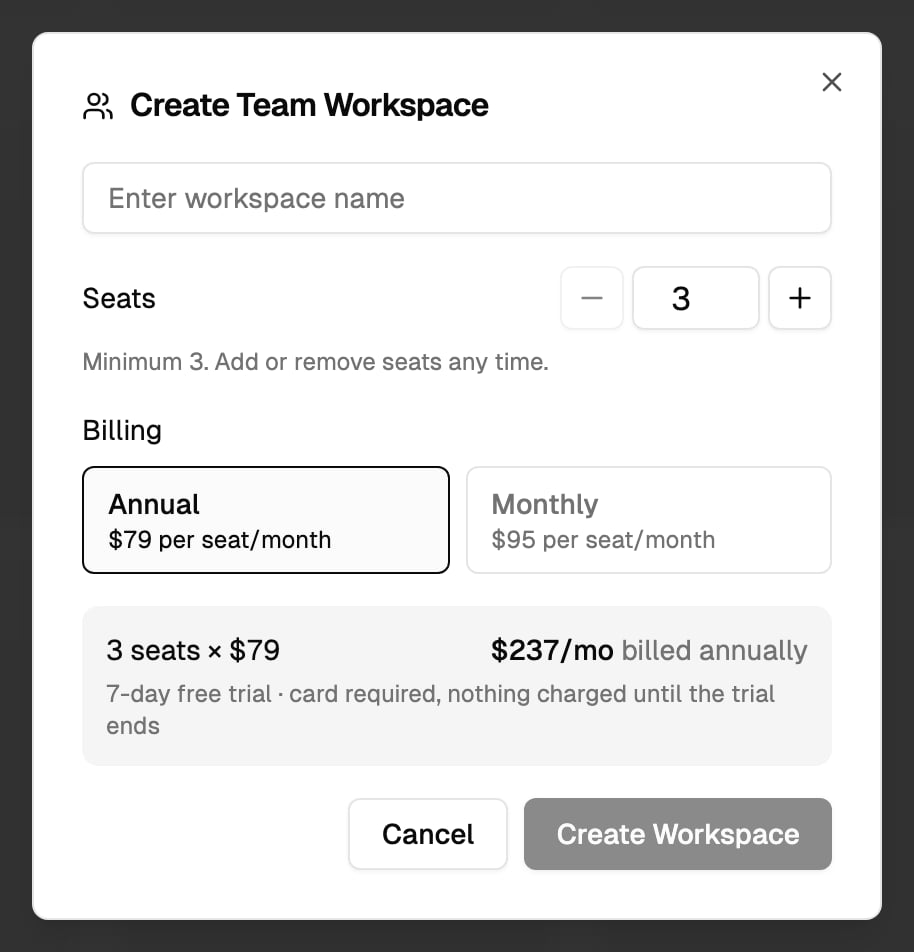
Enter a workspace name. Set Seats with the − and + buttons or by typing a number. The minimum is shown under the picker. You can add or remove seats later.
3
Choose billing
Choose Annual or Monthly. The dialog shows the price per seat and the total.
4
Check out
Click Create Workspace and enter your payment details at checkout. The workspace is created when checkout is complete, and you’re its owner.
5
Invite your team
See Members and roles.
The free trial
Team plans start with a free trial (see the table above). A card is required, and nothing is charged until the trial ends. Each person gets the trial once: if you’ve already had a team trial, a new team workspace you create is charged from the start. While the trial runs, Settings > Billing shows Free trial ends with the date of the first charge.Manage billing
Only the workspace owner sees Settings > Billing. Admins and members don’t see it, and they don’t see prices. In a personal workspace, you’re the owner. The Billing tab shows:Change the number of seats
1
Open Billing
Open Settings > Billing.
2
Pick a new number
Next to Seats, use − and + to pick a number.
3
Save
Click Set to N. You see Workspace now has N seats.
Stop paying for unused seats
If you pay for more seats than are in use, Billing says You are paying for N unused seats with the monthly cost. Click Release N to drop them. Your next invoice is prorated.Pause, export or delete a team workspace
The owner of a team workspace can pause billing, download everything, or delete the workspace in Settings > Danger Zone. A paused workspace is read-only and workflows stop. See the Settings reference.If a payment fails or a team plan ends
If a payment fails, Status shows Payment failed. The workspace keeps working while the payment is retried. Update the card with Manage. If a team plan ends, the workspace becomes read-only. The owner can reactivate it with a new checkout. A team workspace that stays ended is deleted after a period, and the owner is warned before that happens.Subscriptions bought in the mobile app
If you subscribed in the iOS or Android app, the subscription is managed by the Apple App Store or Google Play, not on the web. Change or cancel it in your App Store or Google Play account. If you try to change it on the web, you see a message saying it’s managed by the App Store or Google Play, and seats can’t be changed from Billing.Buy more workflow files
On a paid plan with a workflow file limit, the owner sees a button to buy a pack of files under Workflow files this period in Settings > Usage. Packs apply to the current period and don’t roll over. See Workflow files.Need help?
Contact us
Questions about plans or billing? Email our team.